


UPDATE: Only 2 seats left available in the August Workshop!
This workshop offers an in-depth and STEP BY STEP system for organizing your image files and streamlining your Lightroom Workflow. I will share and explain all of the shortcuts and tips that have made my image selection easy, my folder structure consistent and helped me actually find images within my catalog.
Using this software has truly changed my feeling about digital photography and made the chore of processing my raw files more of a pleasure! It’s amazing how much my creativity has grown now that I am really comfortable with how to use the presets and develop tools and how quickly I’m able to review, select and organize my images.
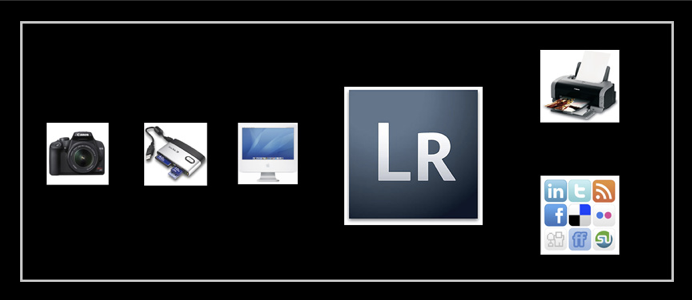
One of the biggest challenges in digital photography is organizing all those image files! Lot’s of workshops offer to walk you through the software tools and show you how they can be adjusted. I take it a step further and actually lay out a step by step Lightroom workflow system for you.
CAPTURE – how to set up your camera for efficient workflow
DOWNLOAD – where to put the files in the first place, folder structure, folder naming
BACKUP- suggestions for hardware and software and step by step on how to use them
IMPORT – using presets and keywords to speed up your workflow and maintain organization structure
ORGANIZE – tips for using the Library module tools to tag with keywords, use smart collections, select favourites, file renaming
EXPORT – sharing or printing your images and creating efficient presets
An overview of how Lightroom works to organize and create folders on your computer, what to do if you have missing image files (the dreaded question mark), how to force save raw file creative adjustments without export, and more! You will get the most out of this Lightroom workshop if you are already familiar with the software. Participants should be experienced or have completed a general Lightroom course.
This semi-private Lightroom Workflow workshop is designed to be very hands-on, with lot’s of opportunity to practice and get questions answered. You will need to bring your laptop (or iMac) with Lightroom installed and updated (version 3 or 4). You are welcome to bring your own images and an existing catalog, however I will provide you with sample images to use during the workshop.
*Please Note: Participants need to bring a computer (Mac or PC, Laptop or Desktop) loaded with Adobe Lightroom Software. You can download a 30 day trial for free at www.adobe.com. It is recommended to upgrade to the latest version, so please check what you are currently using.*


Level:
Beginner/Intermediate. Basic photography knowledge recommended.
Enrollment:
Maximum 6 participants.

Equipment Needed:
Laptop or Desktop Computer with Adobe Lightroom software installed and a folder with 100 RAW file images.
We Provide:
Detailed course notes.

Early-Bird Discount:
Most of our courses and workshops offer a 10% discount is applied automatically if you register before the Early-Bird Discount deadline date listed in the registration table below.
Some courses and workshops offer a discount if you're among the first 3 people who register. This discount will replace the 'standard' Early Bird Discount mentioned above, and will be applied automatically during the online registration process (as long as it is available). Check the course/workshop listing page for more details.
Group Discount:
A 5% discount will be appplied if 3 or more people register at the same time for the same workshop. (All 3 tuitions must be paid for by one credit card to be considered a group registration.) Please follow the instructions on the online registration page.

In order to provide the best learning environment possible VPW keeps class and tour sizes limited to 10-15 people (depending on the workshop). This is but one reason that we count on you to attend your chosen class or tour, once you have registered for it.
If you must withdraw for any reason please be aware of our refund policy as follows:
For our Local Lectures, Seminars, and Workshops valued at or under $100, VPW is unable to provide a cash refund. Transfers are limited to one transfer to either the same event at a later date, or a different event of equal value. VPW requires 48 hours written notice in order to make such a transfer (email notice is acceptable). The event you are transferring to must occur within 6 months of the original event you registered for. A $15 fee will be applied to all transfers.
For our Local Workshops, 1 to 5 days in length and our Local 4 to 10 Week Courses, VPW requires 30 days written notice (before the event start date) of your withdrawal in order to provide a refund. (Email notice is acceptable.)
For our Master Photographer Series workshops, 1 to 5 days in length, VPW requires 60 days written notice (before the workshop start date) of your withdrawal in order to provide a refund. VPW may retain 15% of fees paid or $150 minimum in processing your refund. If the tuition is less than $500 the minimum fee drops to $75.
Within 45 days of the Master Photographer Series workshop date all fees paid are non-refundable.
For our Photo Tours (national and international), the following charges will apply:
- If you cancel up to 3 months before the tour start date and we can fill your space, your reservation (or deposit) fee will be refunded
- There is no additional cancellation fee up to 8 weeks before the start of your tour
- From 8 weeks to 4 weeks before the tour: 25% of your balance
- From 4 weeks to 1 week before the tour: 50% of your balance
- From 1 week to 72 hours before the tour: 75% of your balance
- If you cancel within 72 hours of the start of the trip, no refund can be paid
- Transaction charges incurred on accepting and refunding payments will be deducted from the refund amount
- In the (unlikely) event that we cancel the Photo Tour, all monies paid will be refunded in full
We highly recommend that you take out travel insurance to guard yourself against monies lost due to unavoidable cancellation by either party.
Transfers (for all events over $100): If you wish to transfer to a different workshop date, VPW requires a minimum of 30 days written (email) notice. All transfers are based on availaibility, and subject to approval by VPW staff. For courses/workshops with tuition above $101, the transfer fee is $35.
Transfer Fees as based on event pricing:
Tuition of $100 and below, the transfer fee is $15
Tuition of $101 and above, the transfer fee is $35
VPW can give no refunds:
If you registered for any event valued at or under $100
If you do not show up for your registered course.
If you register for a course beyond or below your skill or ability level.
Refunds for all events valued at $101 and above (excluding Master Series Workshops):
If a student wishes to cancel their registration for any of VPW's events, and has provided written notice within the appropriate timeframe, a refund less a $50 administration fee will be provided.
Course Cancellation:
Occasionally, we may have to cancel a course due to low enrollment. In this case, we will issue a full refund of all monies paid to VPW up to that time.
Instructor Replacement:
In the event that a listed instructor is unable to participate because of a change in his or her professional schedule, we will replace the instructor with someone of equal or similar credentials. If we cannot find a replacement in due time before the course is about to start, a particular class may have to be rescheduled.
Liability
In the event that we cancel your course, for any reason, the extent of VPW's liability is limited to the return of all monies paid. We will do everything we can to register you in another equivalent course. VPW will not be responsible for reimbursement of travel expenses of any kind.
Please note: An administration charge of $50 applies to all refunds
Read complete refund and liability policy
"Thanks again for the course...tons of very useful info for a newbie like me. Well worth the time and money!!!"
The Lightroom for High Volume Workflow One Day Workshop is taught by the following instructor:

Read Aura's Biography
Please choose your workshop date from the registration table below.
| Class | Dates | Time | Early-Bird Discount Offer: | Location | Instructor | Registration |
|---|---|---|---|---|---|---|
| Sunday | April 29th, 2012 | 10am-5pm | N/A | VPW Studios | Aura McKay | SOLD OUT! |
| Sunday | August 12th, 2012 | 10am-5pm | Fisrt 3 registrants receive $20 discount off regular tuition | VPW Studios | Aura McKay | SOLD OUT! |
| Sunday | September 30th, 2012 | 10am-5pm | Fisrt 3 registrants receive $20 discount off regular tuition | VPW Studios | Aura McKay | SOLD OUT! |
| Saturday | November 24th, 2012 | 10am-5pm | Fisrt 3 registrants receive $20 discount off regular tuition | VPW Studios | Aura McKay | Click Here to Register |
| One Day | TBA, 2013 | 10am-5pm | TBA, 2012 | VPW Studios | Aura McKay | Click Here for Wait List |